Turning a daily service queue into a working plan
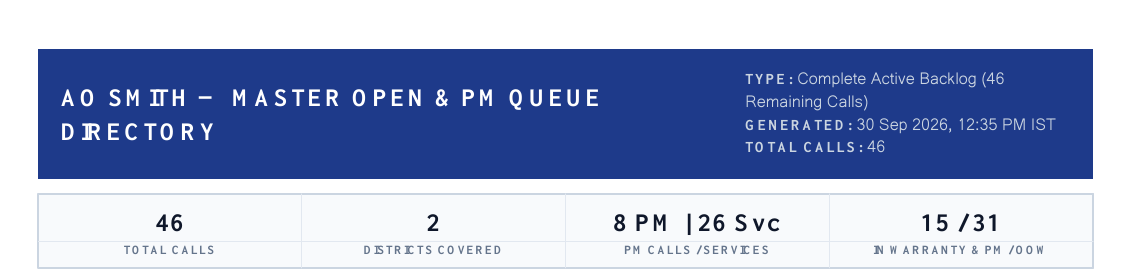
A service manager was spending time each day collecting open calls from a portal and passing the work on. I built a workflow to turn that repeated task into an organized report.
The same work, every day
A service manager starts the day with a queue of calls. Each case has details that matter: who needs help, where they are, what kind of service is required, and who on the team should follow up. Before a technician can act, that information has to be collected and shared in a form people can actually use.
In this case, the manager was logging into the AO Smith service portal, gathering open calls and sending the relevant information to employees. The information was already in a system, but the work of getting it out, organizing it, and distributing it still had to be repeated. It was not the kind of task that required a new decision every morning; much of the effort was moving and arranging the same categories of information.
From the portal to a useful directory
I built the automation around the manager’s existing workflow. It signs into the service portal using the credentials provided for the job, collects the relevant case information, and groups the resulting queue by area. The purpose of the grouping is practical: it helps the team look at the work by location instead of sorting through one long, undifferentiated list.
The data is then laid out as a PDF directory. A summary gives a quick view of the queue, while the detailed pages organize calls into sections. The original report contains the information a technician needs to follow up, including contact details; the excerpt on this page deliberately shows only the summary so customer information is not exposed.
The screenshot comes from a particular report, not a performance benchmark. Its counts describe that report at that moment; they should not be treated as a claim about time saved or the number of calls handled in every run.
- PortalOpen cases collected
- DirectoryCases grouped by area
- HandoffReport shared for follow-up
The report excerpt above leaves out customer details.
Getting the information to the team
A report is most valuable when it reaches the people who need it. The workflow is designed to send the prepared information by email so the manager does not have to rebuild and distribute the same list manually. The PDF’s layout is part of the solution: the recipients should be able to scan the summary, find an area, and reach the call details without reconstructing the data themselves.
The wider idea is to carry that organized work into individual assignments as well. With Gmail and a task integration available through MCP, a manager could connect a case to the person responsible and place the relevant follow-up details where they already manage their tasks. The exact task assignment and integration behavior should be verified against the deployed configuration before being presented as automatic for every case.
Designing for the person doing the job
I did not want the output to be a raw spreadsheet dump. A service directory needs an order that makes sense during a busy day: a clear overview, geographic grouping, and enough information to identify and contact the customer. The aim is to make the next action easier to find while leaving the team’s judgment intact.
Portal automation also needs care around credentials and changes to the underlying website. The case study describes the workflow rather than exposing login details, and the public excerpt leaves out personal information. A useful automation should make the work easier without turning sensitive customer records into public portfolio material.
What changed in the workflow
The central improvement is the handoff: instead of starting every day by manually assembling the queue, the manager has a repeatable way to collect, organize, and share it. The report is evidence of the format produced; a measured time saving or a claim about completed assignments would require separate records.
This is the kind of automation I find useful: it starts with a real routine, keeps the people involved in control, and removes the repetitive preparation that sits between information and action.